

How to Grow Organic Visibility with Google’s AI Overviews
Google’s AI Overviews (aka AI Mode) change how people see results and discover brands. They summarize complex queries and push curated links to explore—great if you’re one of those links, risky if you’re not. Google says AI Overviews aim to help users “get to the gist” and jump into source sites; it’s rolling out broadly and evolving fast.

What AI Overviews are and Where Your Site Can Appear
What it is: For queries Google deems complex or open-ended, AI Overviews generate a concise answer composed by Google’s models, with citations and link cards beneath so people can “dig deeper.” You can’t opt sites into (or out of) the feature—it’s algorithmic.
Where you can show up:
- Cited links immediately under the AI snapshot when your content is judged useful, trustworthy, and directly relevant.
- Traditional organic results below the overview—still vital for traffic capture when users scroll.
- Related modules (images, videos, news, local packs) that the AI may reference or sit alongside.
Treat AI Overviews as a new, volatile above-the-fold surface that rewards expertise, clarity, and evidence.
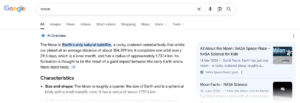
The Playbook That Earns Citations (and Clicks) From AI Overviews
1) Lead with perspective
- Publish point-of-view content by named experts that answer nuanced questions.
- Back claims with first-party data, client results, and clear explanations—all signals Google associates with “helpful, reliable, people-first content.”
2) Build FAQ clusters around key services
- Turn sales objections and pre-purchase questions into FAQ sections on service pages and standalone FAQ articles.
- Use natural-language; keep answers tight, cited, and updatable. (This aligns with Google’s guidance to create content that genuinely helps people, not search engines.)
3) Publish first-party data assets
- Quarterly benchmark posts, pricing studies, and anonymised performance stats become highly quotable.
- Include a methods section and downloadable charts. These are ideal “sources” for AI Overviews to reference.
4) Use original visuals that explain
- Flowcharts, architecture diagrams, and before/after screenshots.
- Add descriptive alt text and captions—good for accessibility and for models that parse context.
5) Technical readiness (quiet but critical)
- Fast, responsive UX supports helpfulness and rankings. Fix long tasks, reduce JS, and prioritise input responsiveness.
- Clean structure & schema: Article/FAQ/Organization/Person; accurate canonicals; tidy internal links.
FAQ’s
How do I get cited in AI Overviews?
Create evidence-rich, expert-reviewed answers to complex questions. Publish first-party data and reference hubs with clear sources and update history. Google’s guidance emphasises helpful, reliable, people-first content—hit that standard consistently.
Can I turn AI Overviews off for my brand?
No. You can’t opt out of the feature; it’s part of Search. Focus on being the best source so your links are featured where AI Overviews appear.
Will AI Overviews kill organic traffic?
Results vary by query. Google says Overviews can increase diversity of sites visited; publishers and SEOs report mixed outcomes. Protect yourself with distinctive content, strong brand demand, and measurement discipline to separate algorithmic/reporting changes from true visibility shifts.


Comments (4)