


Getting paid: Shopify Payments and other gateways
Cash flow wins. Drama with payment gateways loses. Shopify gives you two main options: Shopify Payments (Shopify’s native processor) and external payment providers. Shopify Payments is the default in supported regions and lets you accept major cards immediately without setting up a separate merchant account.
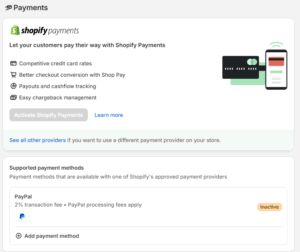
To activate Shopify Payments, you go to Settings → Payments, select Shopify Payments, and complete the account setup with your business and bank details. Once active, you’re automatically set up to accept all major payment methods, and you avoid the extra hassle of entering third-party credentials. This is fast and clean for most brands.
If Shopify Payments isn’t available in your region or you have a specific gateway requirement (PayPal, alternative BNPL, niche payment rails), you can choose a third-party provider instead. From Settings → Payments you hit “Choose another provider,” pick from the supported list, add your account credentials, and then activate. That swap determines what appears at checkout — and directly shapes perceived trust.
One more lever here: payment capture. Shopify lets you decide if you capture payment automatically or manually. In Settings → Payments, you can change capture method to take payment instantly or only when you fulfil the order. For B2B workflows or pre-orders, delayed capture can be part of your margin control strategy.
Our approach is simple: make paying feel safe, fast, and flexible — and align capture logic to your fulfilment reality so you’re not stuck issuing refunds on stock you don’t have.
If you’d like help configuring payments and capture rules around your cashflow model, chat with us and we’ll map it to how you actually fulfil.


Comments (4)