


Shopify shipping strategy: rates, zones, and profiles that don’t destroy margin
Shipping is not “set free shipping and pray.” Shipping is positioning. In Shopify, you control how shipping is priced and where it applies using three core pieces: shipping zones, shipping rates, and shipping profiles.
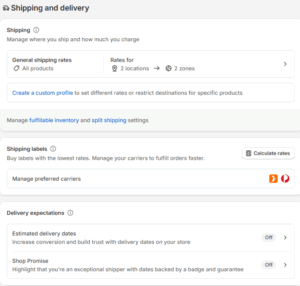
Shipping zones are groups of countries or regions. You create them under Settings → Shipping and delivery, choose a shipping profile, click “Add shipping zone,” name it (“Australia Metro,” “NZ,” “International”), and assign regions. Zones let you say “customers in X area pay Y amount.” No zone = no rate at checkout.
Shipping rates are what customers see at checkout. Shopify supports flat rates, free shipping thresholds, and calculated (carrier) rates. You can do price-based or weight-based logic — for example, $4 for carts under $50 and $10 for carts over $50, or tiered rates that switch once weight crosses 5 kg. This is where you defend margin and frame value (“Express Upgrade,” “Bulky Item Freight,” etc.).
Shipping profiles take it further. Profiles let you create different rate rules for different product groups — e.g. lightweight accessories vs oversized freighted items — and assign fulfilment locations to each. You can create a custom profile, add specific products to it, and control origin and pricing logic for those SKUs independently. That means you’re not forced into “one-size-fits-none” shipping.
Our view: keep customer choice simple (“Standard / Express”), keep internal rules specific, and revisit regularly. Bad shipping logic is one of the most common reasons customers abandon checkout.
If you want us to audit your current Shopify shipping setup and build rates that protect both conversion and margin, get in touch and we’ll walk you through it.


Comments (4)